
Kids’ Safety on YouTube: A Parent’s Guide to Boundaries, Controls and Screen Time.
On November 17, I was invited to a YouTube event in Toronto with some of the city’s top mom influencers and bloggers. The topic: kids’ safety on YouTube.
The event was an open conversation on parenting in the digital age with Dr. Garth Graham. We connected with fellow creators and got a closer look at YouTube’s family safety tools.
First, I appreciated that YouTube is taking ownership of this topic. They opened the floor, listened, and gathered feedback from parents.
Why YouTube is different
From my point of view, YouTube is different from other social media platforms for one big reason: you don’t need an account to watch. It’s open to everyone.
Around age 10 or 11, as kids move into their tween years, we see a shift. They go from watching YouTube videos on the TV or tablet to scrolling YouTube Shorts on a phone. TikTok and Instagram require an account. YouTube Shorts doesn’t, so anyone can watch on a mobile device without signing up.
I wrote this summary for parents like me: parents who understand the risks of YouTube, but also know that technology is part of our lives and our kids’ lives. The goal isn’t to ban it. It’s to set healthy boundaries.
Kids’ safety on YouTube: what parents need to know
1. Set boundaries as a family
The freedom and supervision we give our kids depends on their age.
Dr. Graham shared a great example using bike riding. A 4-year-old rides right next to you. An 8-year-old can ride up and down your street. A 16-year-old can bike anywhere they want to go.
Boundaries can be dynamic and responsive. Every family sets different ones, and they can change over time. During COVID, our kids spent hours in front of screens. As things changed, we could scale that back and set new rules. You can open up more freedom, or pull it back, as your family needs.
2. Co-watch with your kids
Co-watching means sitting down and watching content together. It gives us a window into what our kids are watching. It also opens the door to healthy conversations about what they take away from it. Try asking:
- Do you agree with that?
- Was that a nice thing to do?
- What would you do in this situation?
- Has that ever happened to you?
3. Why kids watch other kids play video games
This one is super interesting, and I’m sure it’s happened in your house too. You catch your kid watching someone else play a video game and ask, “Why don’t you just play the game yourself?”
The truth is, adults watch other people do things all the time. I’ve caught myself watching a stranger clean their house on Instagram, and I bet you have too.
We like watching other people do stuff. Kids like watching other kids play, because video games are part of their lives. (Just like cleaning is part of mine. 😉)
4. YouTube is an open platform
Anyone can upload almost any content they want. YouTube has its own controls and review process, but at the end of the day, it’s an open video-sharing platform. That’s exactly why parental guidance matters.
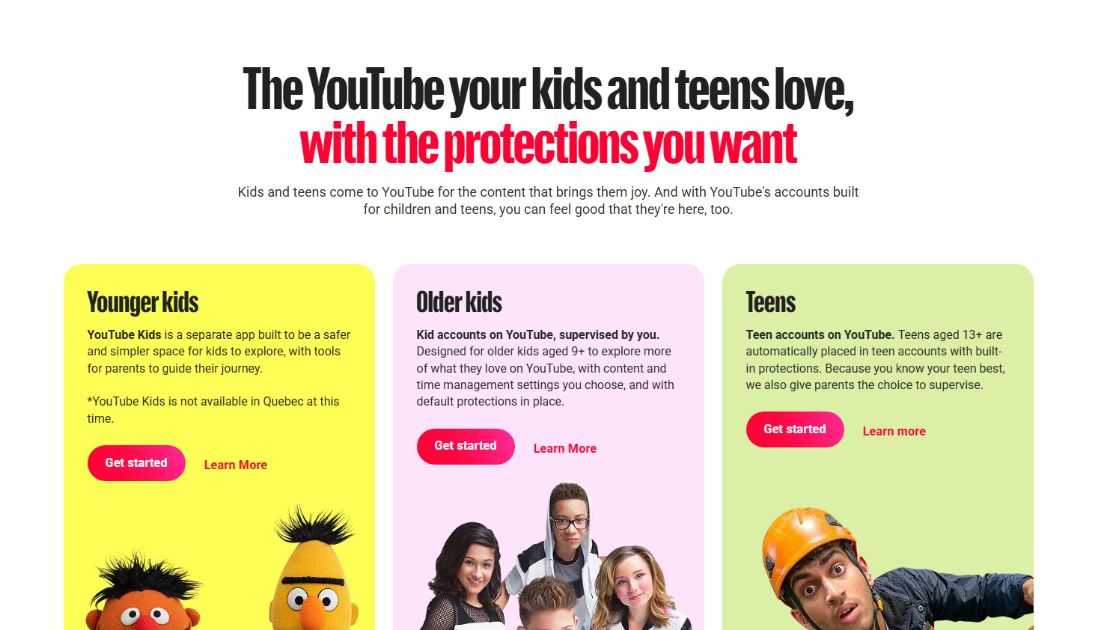
YouTube Kids’ safety tools for parents
YouTube has a lot of tools parents can use to control and limit their kids’ viewing.
1. YouTube Kids
An app made just for kids (roughly ages 4 to 12). It only shows kid-friendly content, filtered by your child’s age and the limits you set. Ads are limited and kid-appropriate.
2. Parental controls with Google Family Link
Install the Google Family Link app to supervise your child’s account. It shows you their screen time, YouTube watch time, and which other apps they use on their phone.
3. Time and content limits
Through the connected account and parental controls, you can cap watch time on YouTube. You can also limit the type of content and topics your child sees.
4. Turn off autoplay
I shared this tip with my followers a few years ago in this blog post. With autoplay off, a new video won’t start automatically when one ends. Your child has to actively choose what to watch next.
My advice: turn it off for all kids.
Kids and short attention spans
One of the biggest issues technology creates today is a short attention span, for adults and kids alike.
It hits kids hardest, since they need to focus through a full school day. But it affects us too, when we need to get through work and long meetings.
The best tool, in my opinion, is scheduled downtime from mobile devices. Take breaks and limit access during the day. Parental controls let you set a break reminder every X minutes of watch time.
Honestly? We parents need that one too.
Why so many kids want to be YouTubers
This was another interesting topic we covered with the YouTube team.
I could say the same about a lot of adults I know, including me. Most of us want to be seen online. That’s the world we live in. Many adults show up on social media and post content and videos regularly, so it’s no surprise kids want to be seen too.
If your kid wants to become a YouTuber, or even post just one video, here are a few safety tips:
- Plan ahead. Don’t just grab a camera and hit record. Think about what you want to film and what’s appropriate for you and your family.
- Skip going live. Record first, and only upload videos after a parent approves them.
- Keep their passwords safe. If you want to delete a video years from now, you’ll need access to the account.
- Turn off comments.
- Share privately. You can upload a video as private and send it only to family and friends.
YouTube is a platform of knowledge, and how you use it makes a real difference.
It’s the story of a kid in Brazil who got into med school. It’s also the story of kids who spend too much time watching, and not enough time touching grass and making real-life connections.
In the end, it’s our responsibility as parents to help our kids navigate the world of technology. Every family will have its own boundaries and values, and that’s okay.


- Kids’ Safety on YouTube: A Parent’s Guide to Boundaries, Controls and Screen Time. - November 18, 2026
- Celebrate Hanukkah in Canada - November 9, 2026
- Free Printable Christmas Advent Calendar - November 9, 2026



Facebook Comments